
Using the API
To use Tax Calculator API you should send a POST request to https://api.drtax.ch/TaxCalculator/, followed by a name of the service (e.g. CantonList).
The request you send should be formatted as a JSON object. All services return a response formatted as a JSON object with UTF-8 encoding.
Authentication
Tax Calculator API uses Hash-based message authentication code (HMAC-SHA256) in order to authenticate and verify your request.
In cryptography, a keyed-hash message authentication code (HMAC) is a specific construction for calculating a message authentication code (MAC) involving a cryptographic hash function in combination with a secret cryptographic key. As with anyMAC, it may be used to simultaneously verify both the data integrity and the authentication of a message. - Wikipedia
HMAC-SHA256 function takes two values, a secret key and a message to be authenticated, and produces a hash value, in our case a signature, typically, a string on 64 characters.
Example:HMAC_SHA256(“3HMe5wUR7CIeaqPF1GQKqsSIWUl3C05p”, “This is a message that I would like to authenticate.”) = fb4f0af06a0d2b2ffddcd661ee5a79bc51a5fbfcc3d8aa779330ed777344a89b
Implementations of HMAC-SHA256 for various platforms are widely available.
More information about HMAC can be found on: IETF - RFC2104, and Wikipedia. Online HMAC generator can be found on: freeformatter.com
Authentication Information
When accessing the Tax Calculator API you must provide the following items so that the request can be authenticated.
- API Key – Your account is identified by your API Key. This key is provided to you after the registration process for accessing the Tax Calculator API. Tax Calculator API will use this key to locate your API Secret.
- Signature – Each request must contain an
HMAC-SHA256signature to verify the validity of the request. This signature is calculated using your API Secret, which is, also, provided to you after the registration process. API secret is known only to you and the Tax Calculator API. After delivering API Secret to you, this secret is never again transmitted over the network.
If either API Key or signature are not present in the request, the request will be rejected.
Authentication Process
Following is the series of tasks required to authenticate your request to Tax Calculator API using an HMAC-SHA256 request signature.
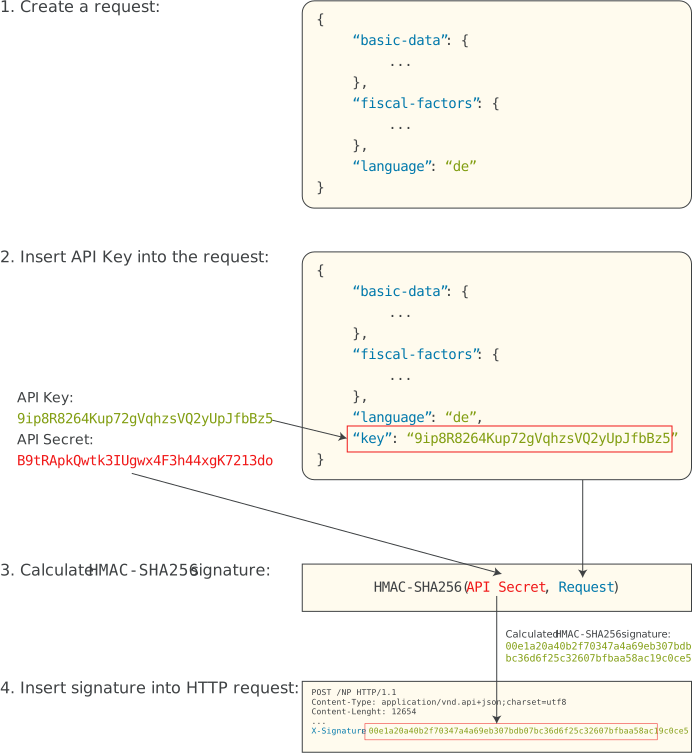
- You construct a request to Tax Calculator API.
- You insert your API key into the request.
- You calculate a keyed-hash message authentication code (
HMAC-SHA256) using your API Secret as key, and your whole request as a message to create a signature. - You include the resulting signature into an HTTP POST request with
‘X-Signature’header.
What we do to authenticate and verify your request:
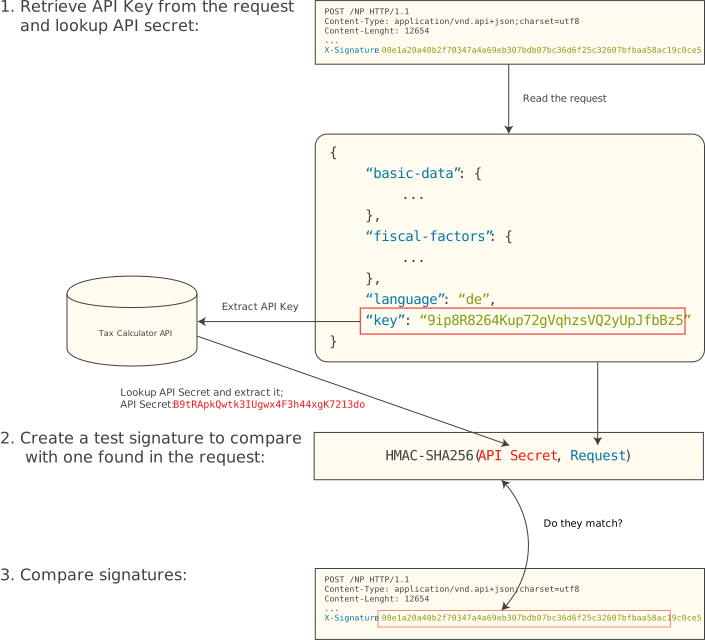
- From your request we retrieve your API key to lookup for your API Secret.
- We generate a test signature by using the same algorithm you used to create your signature.
- If this test signature matches the one found in the request, the request is considered authentic and it is being served. Otherwise, the request is rejected.